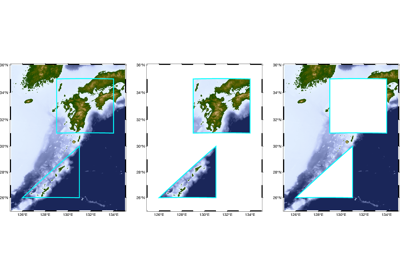
pygmt.grdmask
- pygmt.grdmask(data, outgrid=None, spacing=None, region=None, outside=None, edge=None, inside=None, id_start=None, verbose=False, **kwargs)[source]
Create mask grid from polygons or point coverage.
Takes one or more polygons or data point coordinates, and creates a grid where nodes that fall inside, on the edge, or outside the polygons or within the search radius from data points are assigned values based on the
outside,edge, andinsideparameters.The mask grid can be used to mask out specific regions from another grid. For masking based on coastline features, consider using
pygmt.grdlandmaskinstead.Full GMT docs at https://docs.generic-mapping-tools.org/6.7/grdmask.html.
Aliases
G = outgrid
I = spacing
N = outside, edge, inside, id_start
R = region
V = verbose
- Parameters:
data –
Pass in either a file name to an ASCII data table, a 2-D
numpy.ndarray, apandas.DataFrame, anxarray.Datasetmade up of 1-Dxarray.DataArraydata variables, or ageopandas.GeoDataFramecontaining the tabular data containing the polygon(s) or data points. Input can be:Polygon mode: One or more polygons with closed coordinates
Point coverage mode: Data points (used with
search_radiusparameter)
outgrid (
str|PathLike|None, default:None) – Name of the output netCDF grid file. If not specified, will return anxarray.DataArrayobject. For writing a specific grid file format or applying basic data operations to the output grid, see https://docs.generic-mapping-tools.org/6.7/gmt.html#grd-inout-full for the available modifiers.spacing (
Sequence[float|str] |None, default:None) –x_inc[+e|n][/y_inc[+e|n]]. x_inc [and optionally y_inc] is the grid spacing.
Geographical (degrees) coordinates: Optionally, append an increment unit. Choose among m to indicate arc-minutes or s to indicate arc-seconds. If one of the units e, f, k, M, n or u is appended instead, the increment is assumed to be given in meter, foot, km, mile, nautical mile or US survey foot, respectively, and will be converted to the equivalent degrees longitude at the middle latitude of the region (the conversion depends on PROJ_ELLIPSOID). If y_inc is given but set to 0 it will be reset equal to x_inc; otherwise it will be converted to degrees latitude.
All coordinates: If +e is appended then the corresponding max x (east) or y (north) may be slightly adjusted to fit exactly the given increment [by default the increment may be adjusted slightly to fit the given domain]. Finally, instead of giving an increment you may specify the number of nodes desired by appending +n to the supplied integer argument; the increment is then recalculated from the number of nodes, the
registration, and the domain. The resulting increment value depends on whether you have selected a gridline-registered or pixel-registered grid; see GMT File Formats for details.
Note: If
region=grdfileis used then the grid spacing and the registration have already been initialized; usespacingandregistrationto override these values.inside (
float|Literal['z','id'] |None, default:None) –Set the value assigned to nodes outside, on the edge, or inside the polygons. Can be any number, or one of
None,"NaN", andnp.nanfor NaN. Defaults are0foroutside,0foredge, and1forinside. When setting these values, keep in mind you are creating a mask grid here which is thought to be applied to a real grid in a second step.edgeandinsidecan also be set to one of the following values:"z": Use the z-values from polygon data (segment header-Zzval,-Lheader, or via-aZ=name)."id": Use a running polygon ID number.
To treat edges as inside, use the same value as for
inside.id_start (
float|None, default:None) – The starting number for polygon IDs wheninside="id"[Default is0]. Only valid wheninside="id".region (
Sequence[float|str] |str|None, default:None) – [xmin, xmax, ymin, ymax] or xmin/xmax/ymin/ymax[+r][+uunit]. Specify the region of interest.verbose (
Literal['quiet','error','warning','timing','info','compat','debug'] |bool, default:False) – Select verbosity level [Full usage].
- Return type:
- Returns:
ret – Return type depends on whether the
outgridparameter is set:xarray.DataArrayifoutgridis not setNoneifoutgridis set (grid output will be stored in the file set byoutgrid)
Example
>>> import pygmt
>>> import numpy as np
>>> # Create a simple polygon as a triangle
>>> polygon = np.array([[125, 30], [130, 30], [130, 35], [125, 30]])
>>> # Create a mask grid with 1 arc-degree spacing
>>> mask = pygmt.grdmask(data=polygon, spacing=1, region=[125, 130, 30, 35])
>>> mask.values
array([[0., 0., 0., 0., 0., 0.],
       [0., 0., 1., 1., 1., 0.],
       [0., 0., 0., 1., 1., 0.],
       [0., 0., 0., 0., 1., 0.],
       [0., 0., 0., 0., 0., 0.],
       [0., 0., 0., 0., 0., 0.]], dtype=float32)